We are excited to share the Release Notes for 26R2.0. The new capabilities delivered include:
Compass Explorer
More Complete Market Definitions with Market Templates
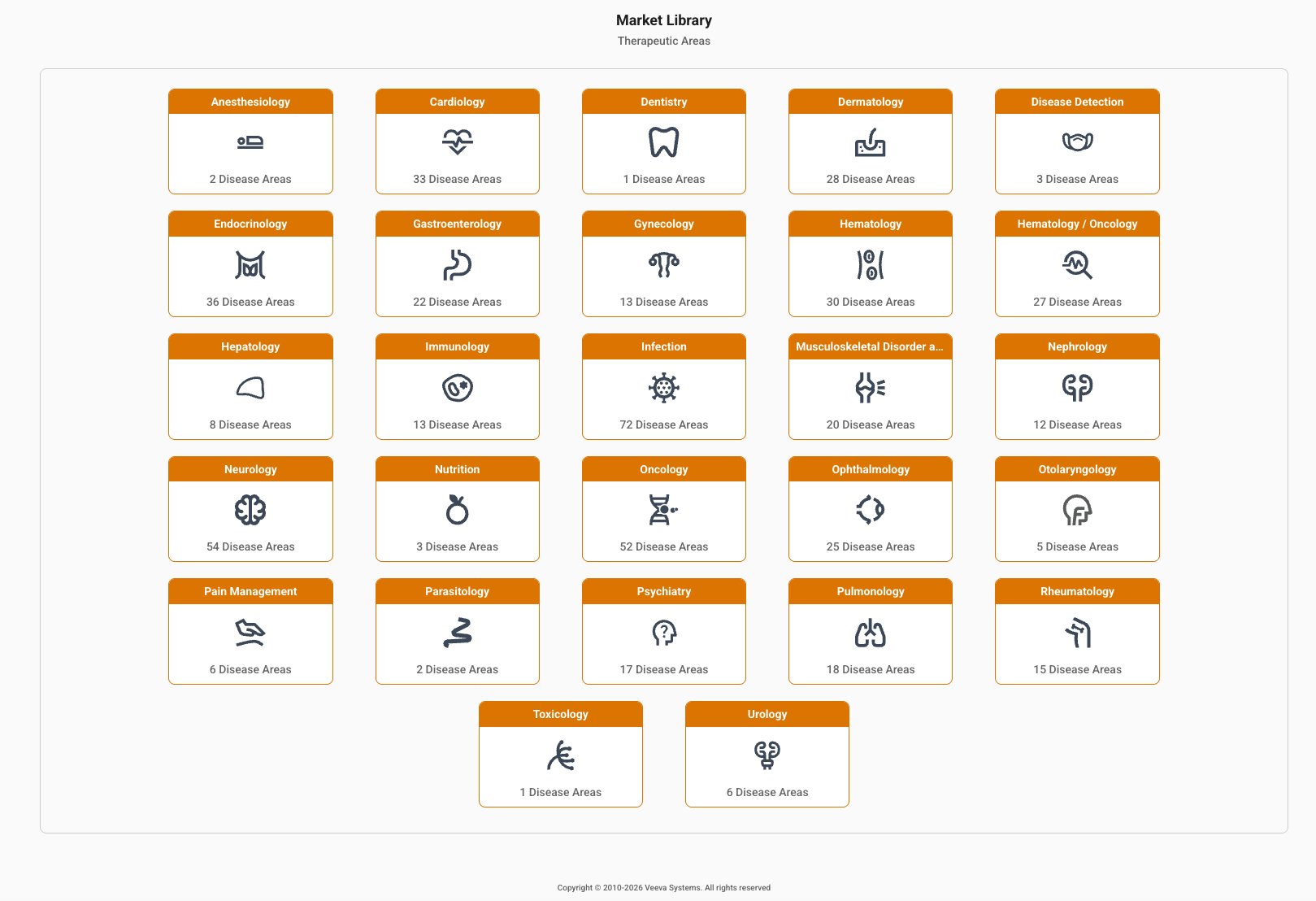
The Market Library allows users to explore Veeva-curated lists of codes that define brands or diseases.
- Navigate a hierarchy of Therapeutic Area > Disease Areas > brands and diseases, saving time on research and helping to pull more complete market definitions.
- View counts of Disease Areas, number of codes and annual patients associated with them
- Add to your query directly to pull the most complete market definition, or save as a template and customize
Market Library links to all Compass products and is accessible through the Compass Explorer navigation bar.
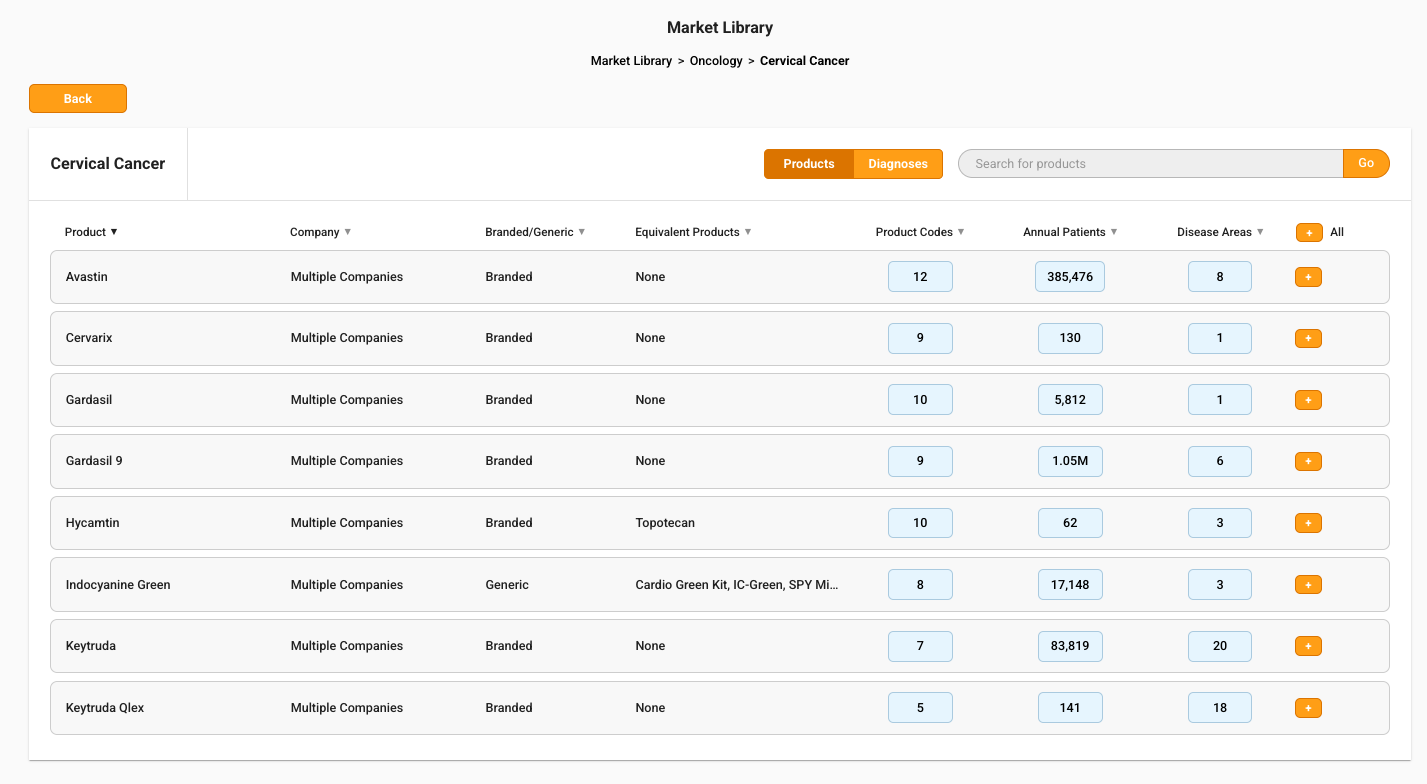
Product Disease Area Library:
- Disease Areas show the mapped Brands, and the number of codes and annual patients associated with them.
- Supports over 4,000 brands that may have more than one Disease Area.
- Code counts include NDCs, and any dedicated HCPCs and ICDPCS to that brand
- Patient counts are the number that have been treated over a 12-month window
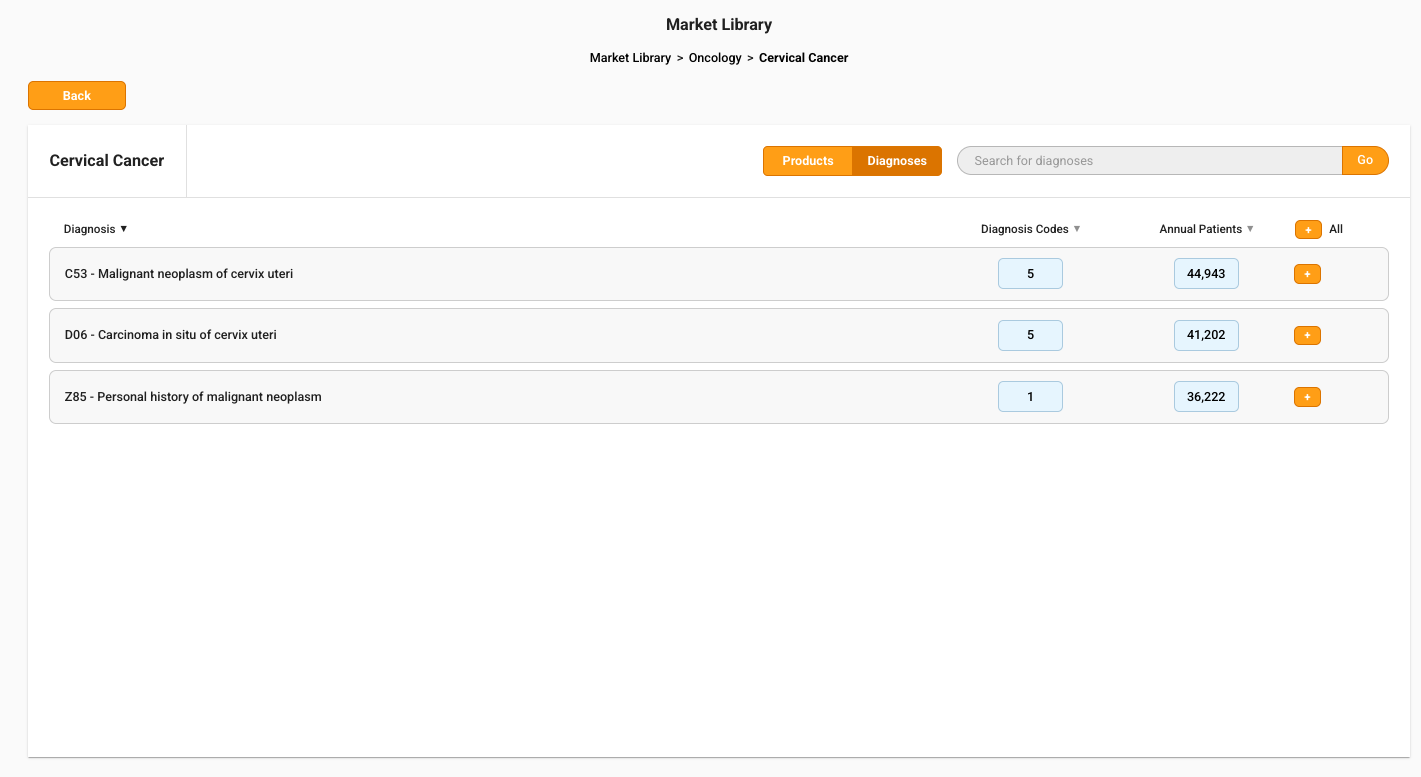
Diagnosis Disease Area Library:
- Disease Areas show the mapped Diagnoses, and the number of ICD10 codes and annual patients associated with them.
- Supports over 40,000 codes, and has one Disease Area per code.
- Patient counts are the number that have been treated over a 12-month window
Improved Search Results Filtering
After searching in Compass Patient or Compass Prescriber, users can click the new Filter icon to narrow their results down to the most relevant results and easily add to their query or template.
- Filter products by Disease Area, Dose Form, and Product Type
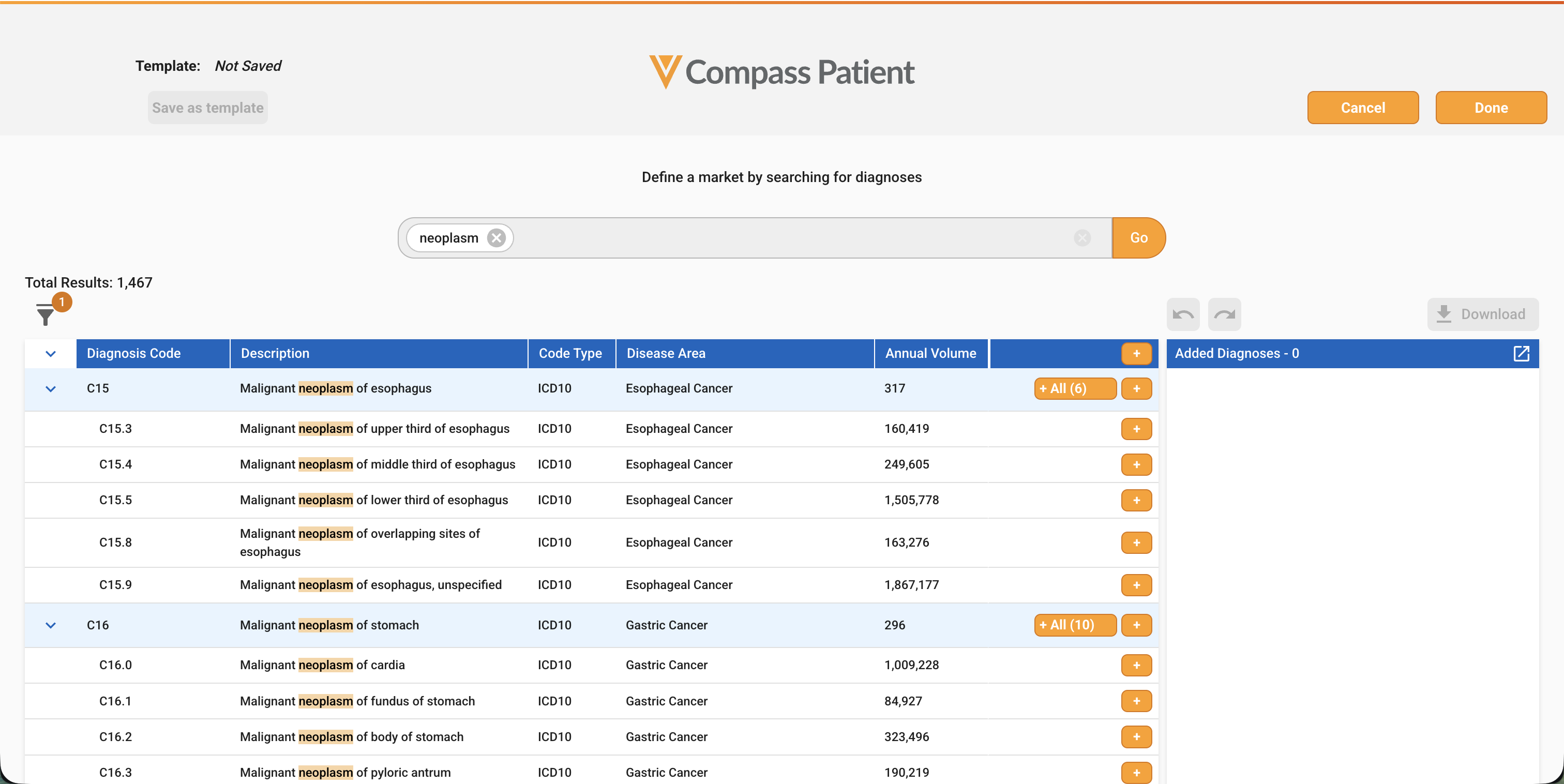
- Filter diagnoses by Disease Area and Code Type
- Filter procedures by Code Type
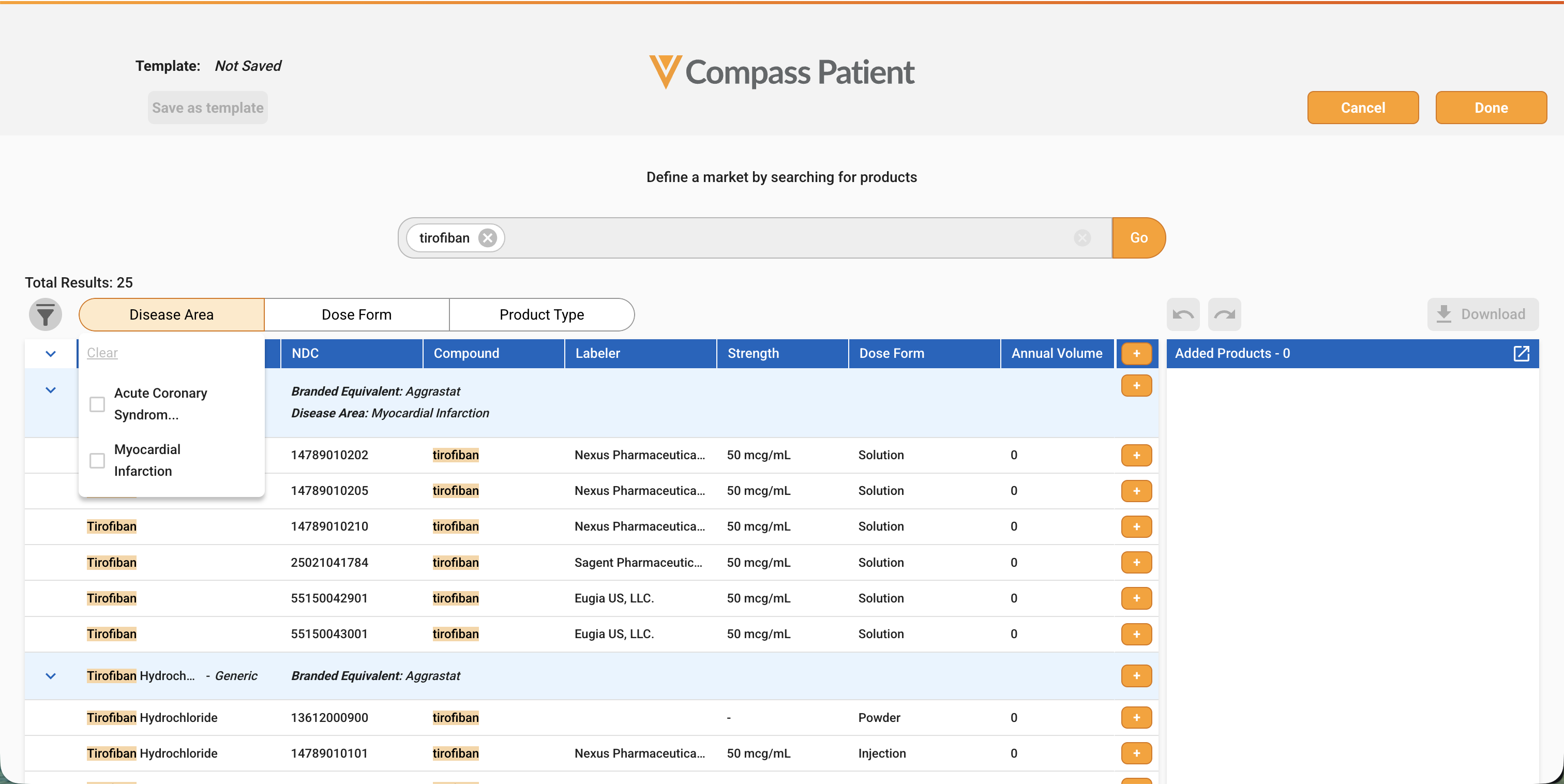
When a filter is applied, a number displays to show the user that their results have been subset. The filter selections can be collapsed by clicking on the icon. The total results of your search shows the real-time adjustments of results as filters are added or removed.
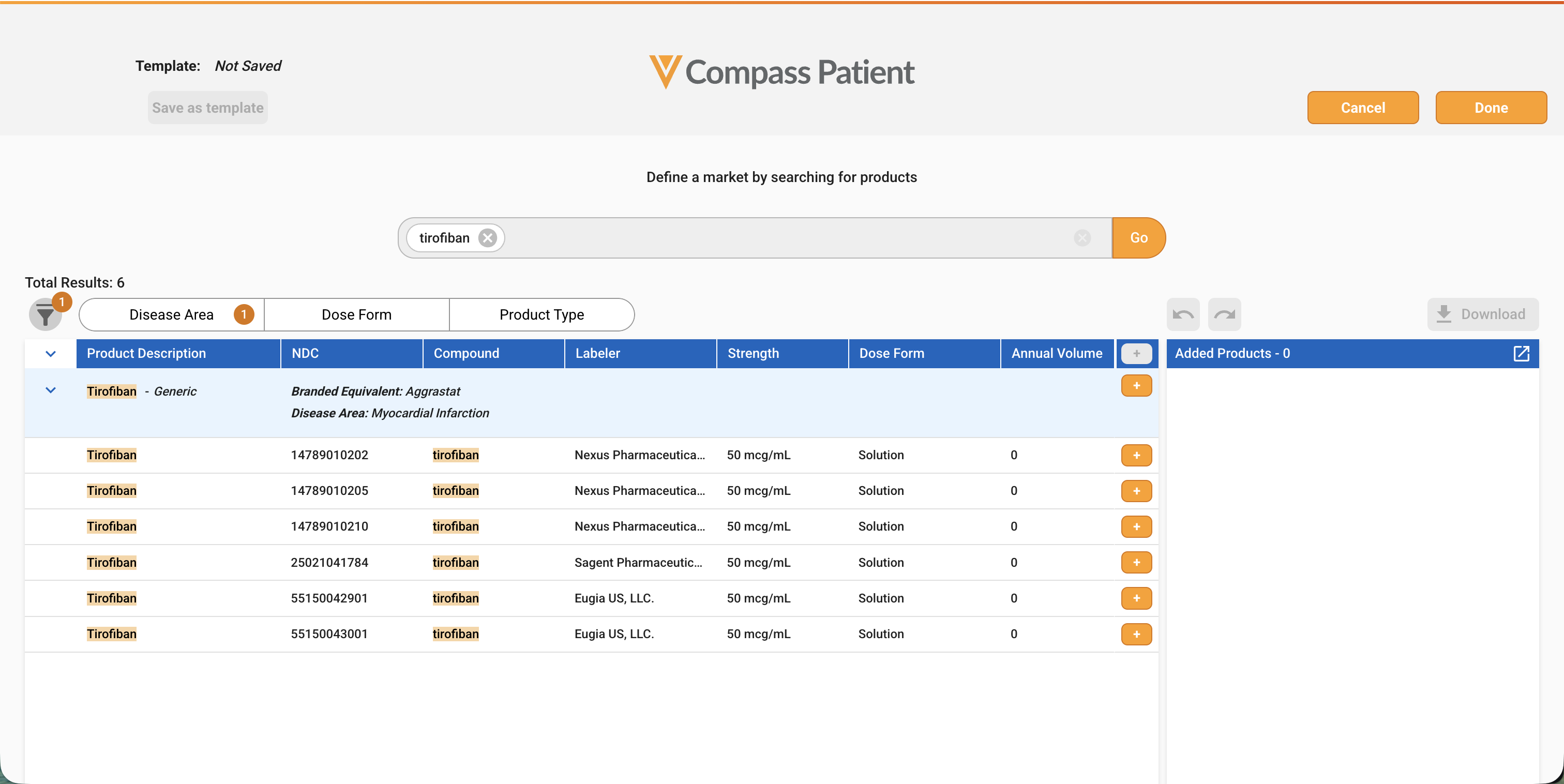
Displaying Disease Areas in Search Results
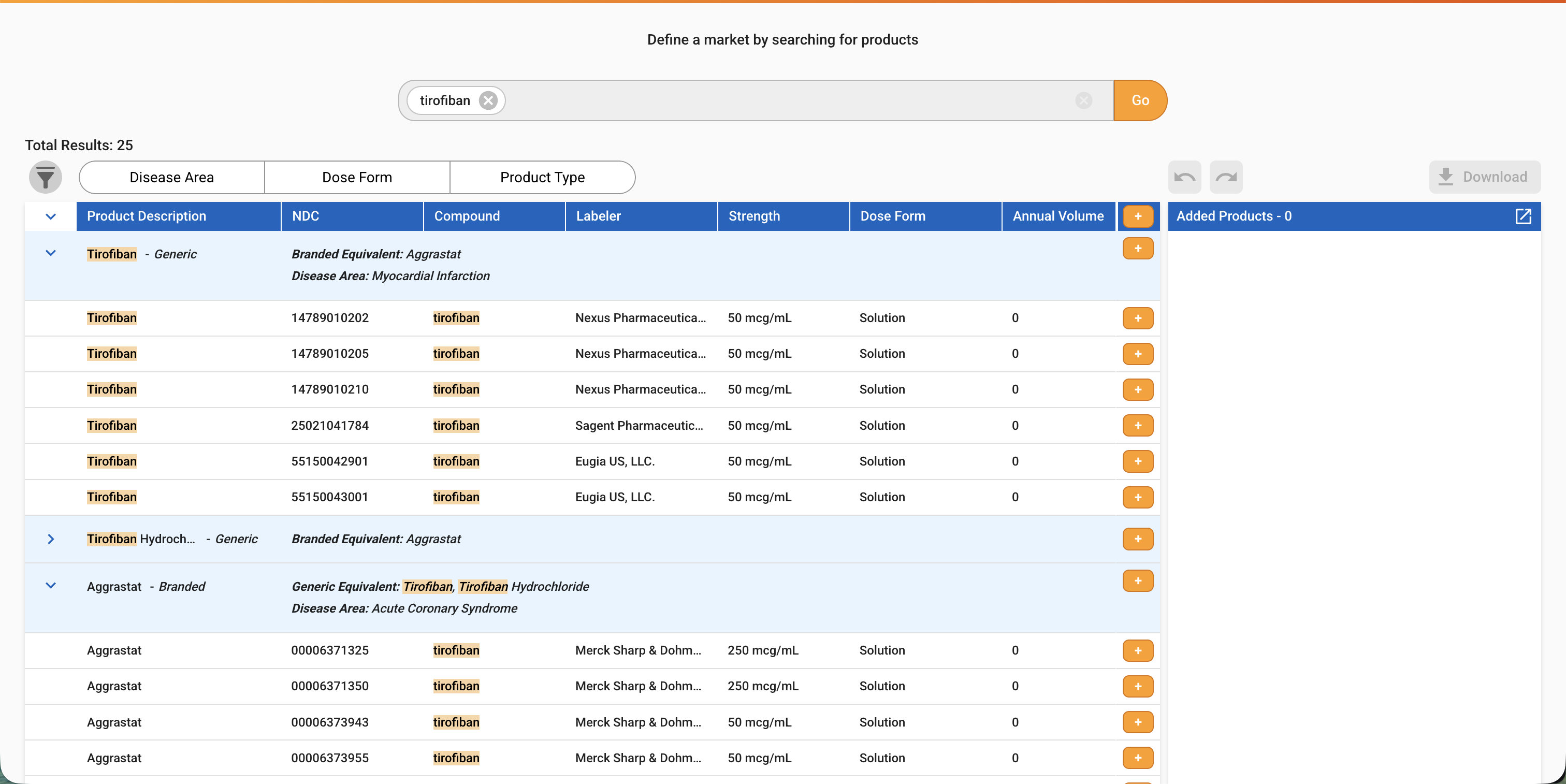
Users can now see the Product and Diagnosis Disease Areas in Compass Patient or Compass Prescriber search results for better visibility into this important domain.
Product Disease Areas display in the blue Brand-level heading in search results. A brand can be associated with multiple Disease Areas.
Diagnosis Disease Areas display on the code-level line in the search results. Each code can be associated with one Disease Area.
Compass Patient
Enhanced Schema with New Attributes
We are pleased to announce an expanded schema for Compass Patient and Compass Pathway. The exciting changes are in two categories:
- New attributes provide deeper insights into transactions and patients.
- Updated & retiring attributes drive value and streamline delivery.
Exciting new attributes provide deeper insights into transactions and patients:
- Expanded HCP data from OpenData for Rendering and Referring HCPs.
- First Name and Last Name facilitates higher quality matching to reference data.
- HCP Type provides more precise filtering to actionable prescribers, including Physicians (MDs, DOs) and Physicians Assistants and Nurse Practitioners.
- HCP Specialty includes more granular values specific to the US health system to improve target lists. This includes expanding Pediatrics to now include thirty pediatric specialties. This can also be helpful when breaking apart specialties like Physical Therapy to keep the prescribing practitioners the Physical Medicine and Rehabilitation specialists, but remove the less actionable Massage Therapists.
- Expanded HCO data from OpenData for Billing Provider and Facility HCOs.
- HCO Name facilitates higher quality matching to reference data.
- HCO Type provides more insight into high-interest US care locations, like Blood and Transplant Center, Infusion Center, and Dialysis Centers.
- HCO Name and HCO type and their corresponding IDs may be nulled for privacy to protect patient residence facilities.
- Diagnosis Codes 7, 8, 9, and 10 and their descriptions and Disease Areas assist in finding new patients whose diagnoses may have been buried in later code placements.
- Queries and Quick Counts with applied diagnosis codes automatically include new patient results for both V3 and V4 schemas. V3 schema users will need to migrate to V4 to see which 7-10 code placement contained the result.
- Expanded payer data from Veeva Payer facilitates more complete hierarchies and improved mastering.
- Parent Payer Veeva ID and Name for the top level payer, and is available on Primary and Secondary payers. Veeva ID Prefix is V08.
- PBM Veeva ID is available on Primary and Secondary PBMs, and matches the pattern of providing Veeva ID with every payer name. Veeva ID Prefix is V11.
- Revenue Codes provide insight into high-interest inpatient care settings and complex procedures including ICU/NICU utilization, many types of inpatient Dialysis, Cell and Gene Therapy and many more.
- DRG Codes provide visibility into high-cost drivers of patient care billed by HCOs as bundled services for a broad variety of surgical and medical procedures, including Transplants, Cardiology, and many more.
Updated and retiring attributes drive value and streamline delivery:
- Providing expanded pharmacy types within the new Facility Type field, and retiring Pharmacy Type. This allows us to deliver more dispensing organizations that are not traditional pharmacy types, including infusion centers and long term care facilities.
- Updating and Retiring Payer fields:
- Updating field names from VID to Veeva ID in Payer and Plan Names, noting that delivery attributes have been transitioned to Veeva IDs already.
- One-time Update to New Veeva IDs for Payer and Plan fields, visible in the data in early September. Users that were using previous Veeva ID’s can receive a crosswalk file to the new values.
- Retiring PBM Relationship Type for Primary and Secondary, which provided limited value.
- Retiring Product_jcode, an imputed field that associated potential J-Codes with the NDCs on the record but were not present on the claim. Compass Explorer now includes the Dedicated Procedure & Product notification that assists users in adding these dedicated codes before running the query to capture this important brand volume.
After the launch on August 24, please refer to the Help Page section, New Schema Transition, for instructions on modifying your ingest process, updating your existing queries, and creating new queries to include these exciting new attributes.
Job Counts delivering pre-built stats
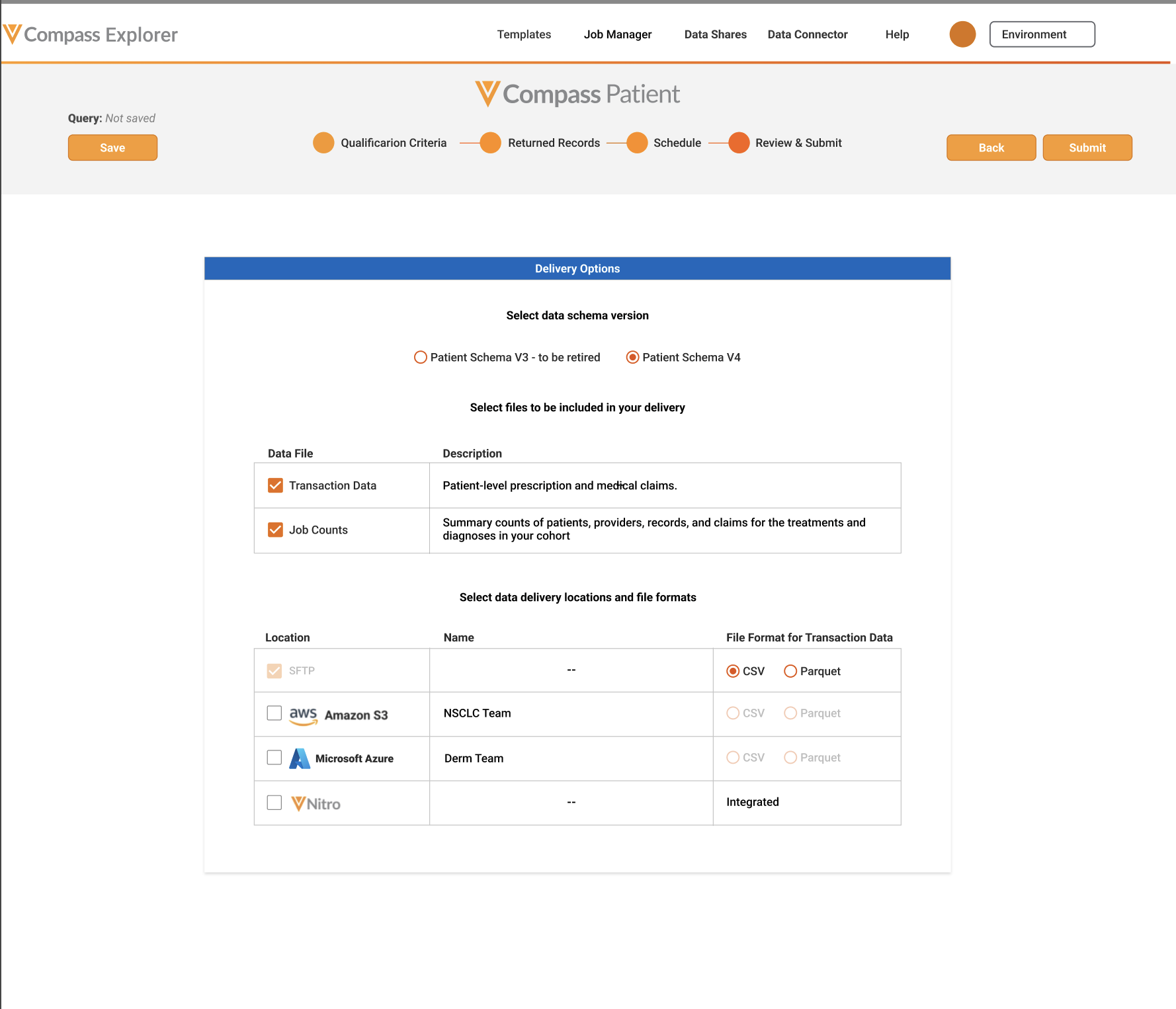
A new and comprehensive Excel deliverable that summarizes counts of Patients, HCPs, Records, and Claims.
- Results are based on your querys Qualification Criteria, including codes, logic, and time period.
- Provides expanded visibility and metrics for Diagnoses, Products, Procedures within the data in easy-to-use pivotable tables.
- Supports a broader set of use cases, including Diagnosed & Treating, and insight into care settings, provider specialties and types, and payment types and top payers.
- Business users can select to only receive Job Counts, if they prefer to not use the transaction-level claims data.
- First page of Job Counts, Query Receipt, is delivered with all Compass jobs and can be downloaded from Job Manager.
- Available when selecting the new V4 schema on One Time, Exact Match queries.
- Existing Job Summary and Query receipt deliverables will be retired.
Data Quality Improvements
As part of the Compass commitment to ongoing quality improvements, a number of attributes are being enhanced for quality and fill rates in both Compass Patient and Compass Pathway.
- Improved data cleanliness and fill rate of valid NPIs and Veeva IDs on over 38K providers
- Cash and Government Payment Types on prescription claims will now have Subtype, Payer Name and Plan Name, improving data usability and fill
- Cash Payment Types on medical records will now have Cash as their Payer Name, improving data usability and fill
- Increased high-level visibility into care settings like Long Term Care, through providing Place of Service Category values on transactions when granular codes are nullified to protect patient privacy
Compass National & Compass Prescriber
As part of the Compass commitment to ongoing quality improvements, several enhancements have recently been incorporated into Compass National and Compass Prescriber projections.
Shared HCPCS Improvements
We have expanded our product specific HCPCS mapping to include 111 new codes. These additional mappings drive increased capture and quality improvements across 90 brands in National and Prescriber. Notably, this update yielded improvements in two key areas:
- Coverage: 1% increase in Mx (Medical Claims) Coverage
- HCP Visibility: There was 3% reduction in TMx ZNS (Zip-Non Specified) values, as more volume can be associated with HCPs or HCOs
Over time, we will continue to push additional procedure code mapping improvements to refine projections and what is mapped to specific products.
Blocked Products Projection Enhancements
We have improved our projection methodology for “blocked” specialty pharmacy products, where HCP and prescription visibility is restricted due to limited specialty pharmacy distribution networks, or manufacturer data blocks.
This update improves accuracy and delivers more representative payer splits for approximately 90 blocked brands. For most products, this means an increase in metrics like TRx, Tx, New Patients, and Total Patients.
Below are examples of therapies expected to see a significant improvement in projection accuracy:
- Daybue
- Modeyso
- Opsynvi
- Orladeyo
- Pyrukynd
- Rezdiffra
- Tarpeyo
- Vykat XR
- Yorvipath
- Yutrepia
These blocked product updates became available in our July projections.