On This Page
- Overview
- Available Delivery Schemas
- Selecting the Schema Version
- Verifying the Schema Version of Completed Jobs
- Understanding Schema Version Changes
- Tips for Migrating to a New Schema Version
Overview
Data delivery schemas specify the set of fields, their order, and expected contents included in the query results file for each product. Veeva Compass provides versioned data delivery schemas which allow customers to plan for a predictable data ingest.
Periodic updates to the delivery schemas allow for new enhancements such as field additions and retirements, as well as naming and data type updates, occurring at most once per year. Each schema version has its own Delivery Package complete with version-specific Data Dictionaries and a version-specific API parameter. Whenever a new schema version is released, Compass will maintain both the current retiring schema and the new enhanced schema in parallel for up to 12 months, providing customers time to migrate and test their ingestion workflows on the new schema without job interruption.
New Compass customers will always be defaulted to delivery on the newest available schema version, even if an older version of the schema is still available.
Available Delivery Schemas
Current, recently announced, and recently retired delivery schema versions for each product are listed below, and referred to as such throughout the documentation and user interface.
| Subproduct | Schema | Launch Date | Retirement Date |
|---|---|---|---|
| Patient | patient_schema_v4 | August 24, 2026 | - |
| Patient | patient_schema_v3 | April 21, 2025 | August 24, 2027 |
| Patient | patient_schema_v2 | April 22, 2024 | April 20, 2026 |
| Pathway | pathway_schema_v4 | August 24, 2026 | - |
| Pathway | pathway_schema_v3 | April 21, 2025 | August 24, 2027 |
| Pathway | pathway_schema_v2 | April 22, 2024 | April 20, 2026 |
| Prescriber | prescriber_schema_v2 | April 21, 2025 | - |
| Prescriber | prescriber_schema_v1 | January 15, 2024 | April 20, 2026 |
| Zip | zip_schema_v2 | April 21, 2025 | - |
| Zip | zip_schema_v1 | January 15, 2024 | April 20, 2026 |
| National | national_schema_v2 | April 21, 2025 | - |
| National | national_schema_v1 | January 15, 2024 | April 20, 2026 |
| State | state_schema_v2 | April 21, 2025 | - |
| State | state_schema_v1 | January 15, 2024 | April 20, 2026 |
| Genomics | genomics_schema_v3 | August 26, 2025 | - |
| Lab Results | lab_results_schema_v3 | April 21, 2025 | - |
| Specialty Pharmacy | specialty_pharmacy_schema_v3 | April 21, 2025 | - |
Selecting the Schema Version
When setting up jobs for Compass Patient, Compass Prescriber, or Compass National, customers with multiple data delivery schemas available will see an additional selection option within the delivery location and file formats menu enabling them to select the data schema version to be used for the job. When only one data schema version is available, this section will not be displayed.
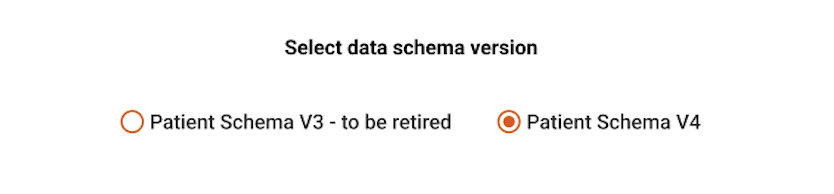
This data schema version selection will be available when:
- Creating a new query
- Editing an existing scheduled query within the Job Manager
- Duplicating an existing scheduled query within Job Manager
Verifying the Schema Version of Completed Jobs
If you find yourself needing to confirm the delivery schema version of your completed jobs, there are two available locations for you to check:
- The Manifest file for every data delivery contains the field schemaVersion. See Understanding the Files and Format for full details on expected delivery package contents.
- The Compass API provides the field schemaVersion in the returned parameter list for every job.
Your Product Expert can also help with confirming the schema version(s) used in your jobs and available to your organization.
Understanding Schema Version Changes
When Compass provides an updated schema version, we may include a few different types of changes from the previous version, such as:
- New (Added) columns - designed to provide new insights or enhanced granularity. Release notes and the data dictionary will help you decide if the new fields can enhance your analysis.
- Dropped (Removed) columns - keeping the dataset clean by removing redundant or obsolete information. When possible, the data governance documentation will provide a suggested replacement field.
- Changed (Modified) columns - altering the name, data type, or expected values of an existing column. These changes may improve standardization of the data or add detail to field contents.
Tips for Migrating to a New Schema Version
To help your team have the best experience in migrating to a new delivery schema version, we have provided suggested steps for preparing to update your jobs.
- Review the provided documentation
- Three weeks prior to the initial release, pre-release notes detailing the planned schema updates will be made available. Additionally, a link to the release notes for each schema version is maintained under Available Delivery Schemas.
- A Data Governance document will be sent to you summarizing the changes, including new, retiring, and modified attributes as well as a description of each change. It also includes a copy of the full Data Dictionary for the new schema version.
- Review the impact of field changes on your pipeline.
- Check whether any of the dropped or modified fields are in use within your data ingest and analytics workflow. If so, your workflow may require updates to work with the new schema version.
- Your Product Expert can also provide a sample data delivery package to use for testing on request.
- Ask your analytics and development teams to review the information and identify any needed changes on their end.
- Run a validation test with the new schema version.
- Your recurring jobs will continue to run on their existing schema version until you actively switch them to the new schema version.
- A side-by-side test run with the current and new schema versions will let you be confident that no information is lost in the transition.
- To create a test run for the new schema version, use the Job Manager to duplicate one of your existing jobs and select the new schema version as described in Selecting the Schema Version. Your other job parameters should remain the same to ensure equivalence. Your Product Expert can assist with this setup if needed.
- Work with your development team to confirm that the new schema version and any new fields you opted to utilize were processed successfully, and that the data contained the record counts and values you expected.
- Update your jobs.
- Once you are happy that the new schema version is ready to be processed, you can update your existing pending jobs yourself through the Job Manager, or your Product Expert will be able to update all pending jobs for you at once.
- Enjoy your improved dataset!
- If you found the enhancements helpful for your analysis, we would love to hear it.