We are excited to share pre-release notes for 26R3.0 coming on December 14, 2026.
Compass Explorer
Visibility into Network Composition & Stats
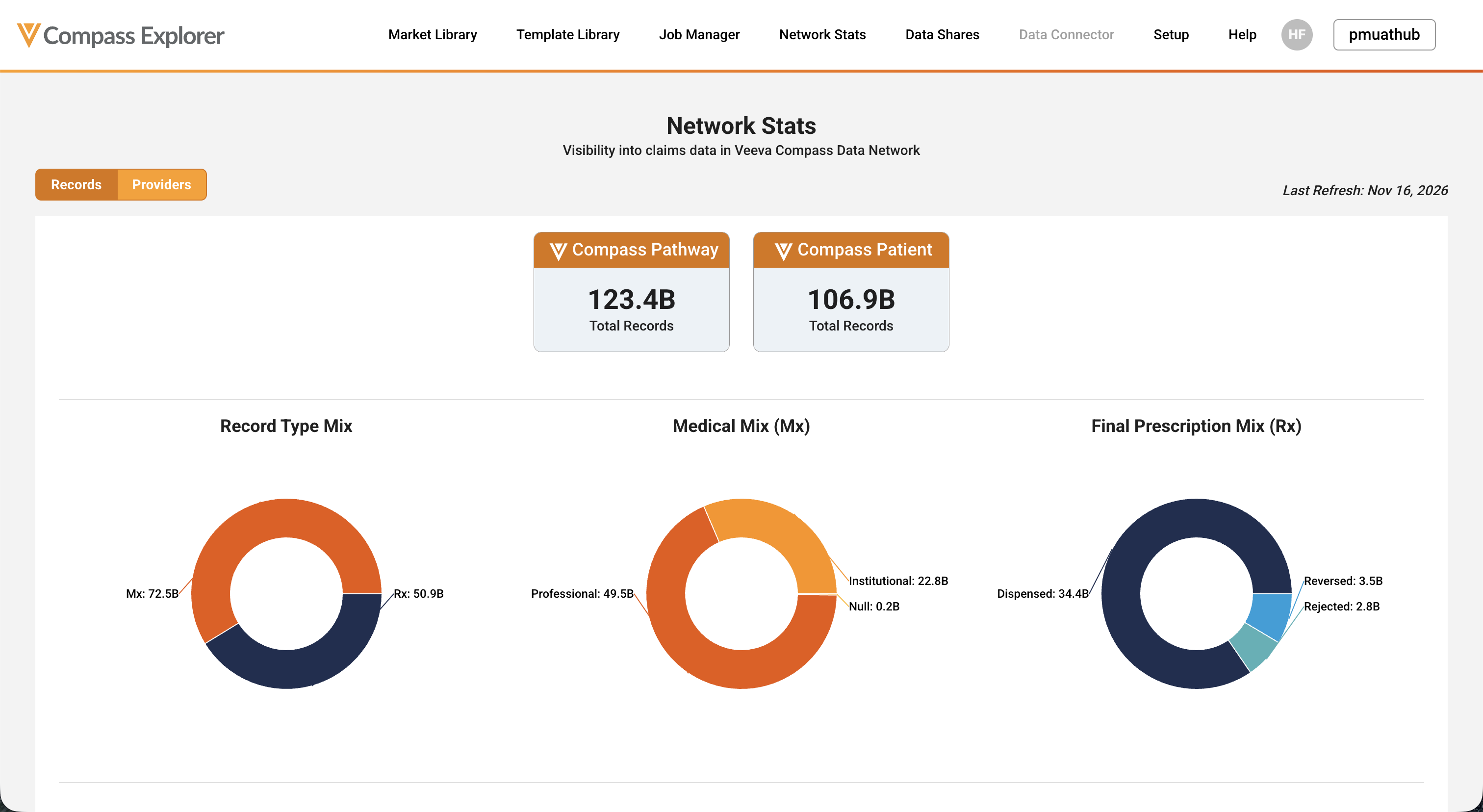
As part of the Compass commitment to data quality and transparency, Network Stats is a dashboard view of compelling metrics on records and providers across the total Compass Data Network.
- Network Stats is accessible to all users through the Compass Explorer top navigation.
- All underlying data is updated daily
- Includes two content areas, which can be viewed using the Records and Providers page filter.
Records stats includes:
- Counts of Medical and Pharmacy records
- Breakout of Institutional and Professional Medical claim types
- Breakout of Dispensed, Rejected, and Reversed Pharmacy scripts - counting on Final Status transactions
- Mix of Payment Types, broken out by Medical and Pharmacy claims
- Medical care delivery settings through Place of Service Groups
- Prescription dispenses through pharmacy distribution channels
- All prescription record counts are calculated based on the full network of Pathway claims, unless otherwise specified
Image: Network Stats provides visibility into claims data in the Veeva Compass Data Network
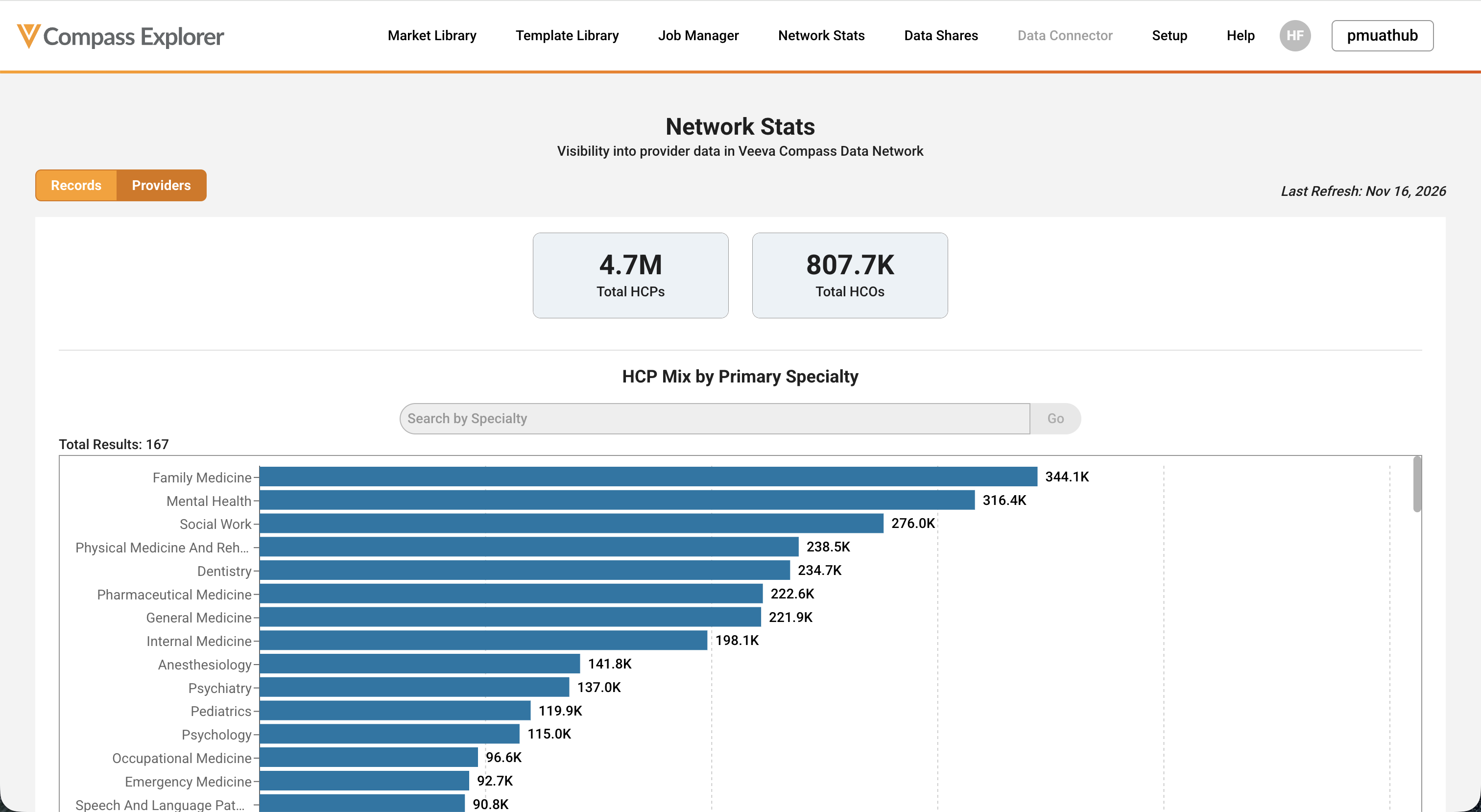
Provider stats includes:
- Counts of HCPs and HCOs
- Searchable List of Primary HCP Specialties
- All HCO and HCO counts are calculated based on every provider field in the data
Image: Network Stats provides visibility into provider data in the Veeva Compass Data Network
Redesigned Template Library
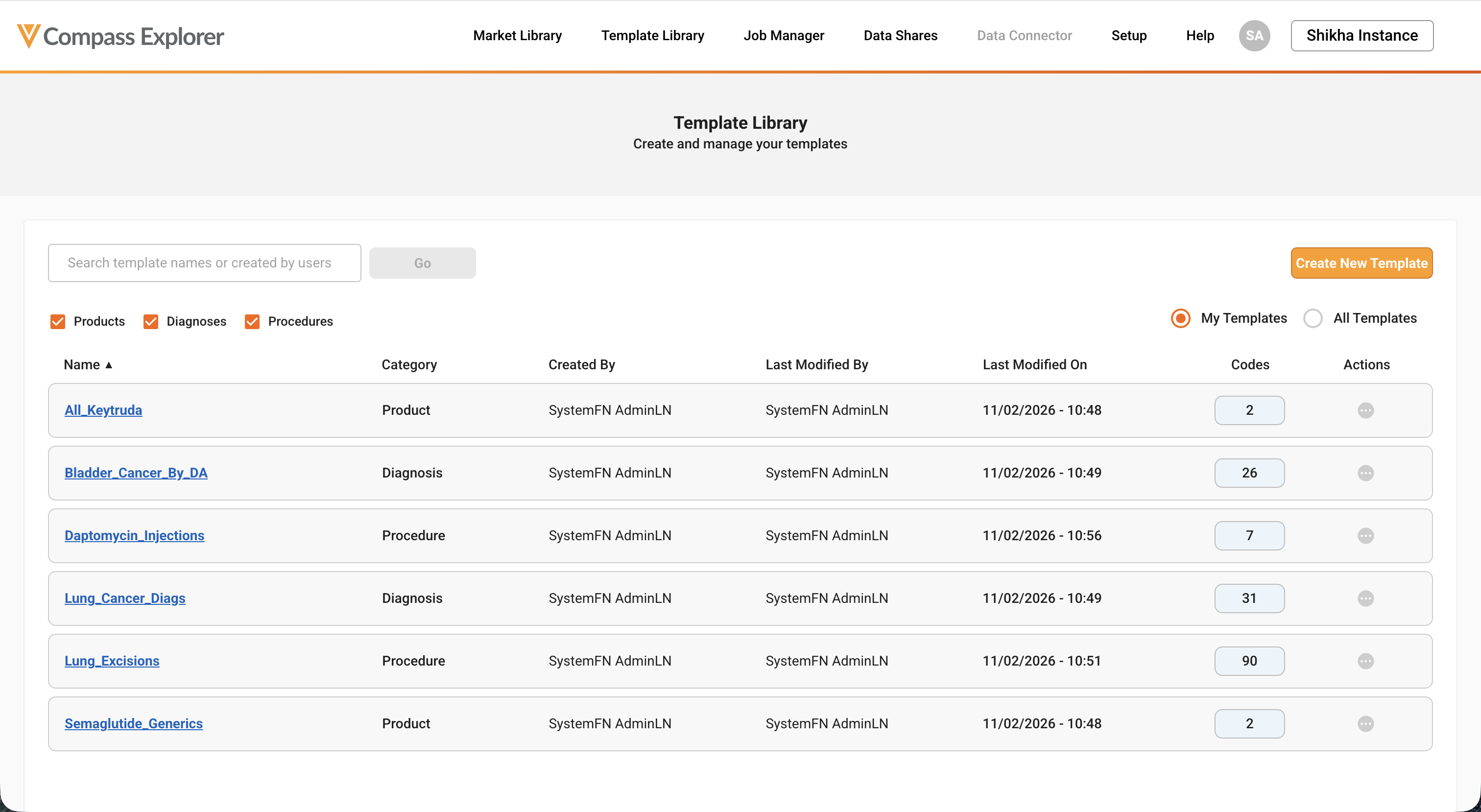
The Template Library has been updated with an improved user experience, making template management more seamless and intuitive across all Compass products.
Templates allow users to curate predefined lists of products (at the brand level), diagnoses, and procedure codes, eliminating the need to manually rebuild frequently run queries.
Image: Template Library provides streamlined view of user-defined lists of Products, Procedures, and Diagnoses
Now includes:
- New navigation using filter checkboxes at the top of the page to quickly isolate templates by category (products, diagnoses, or procedures).
- Search for specific templates by name or creator, and utilize a top-right toggle to switch between viewing “My Templates” (selected by default) or All Templates created by all users in my instance.
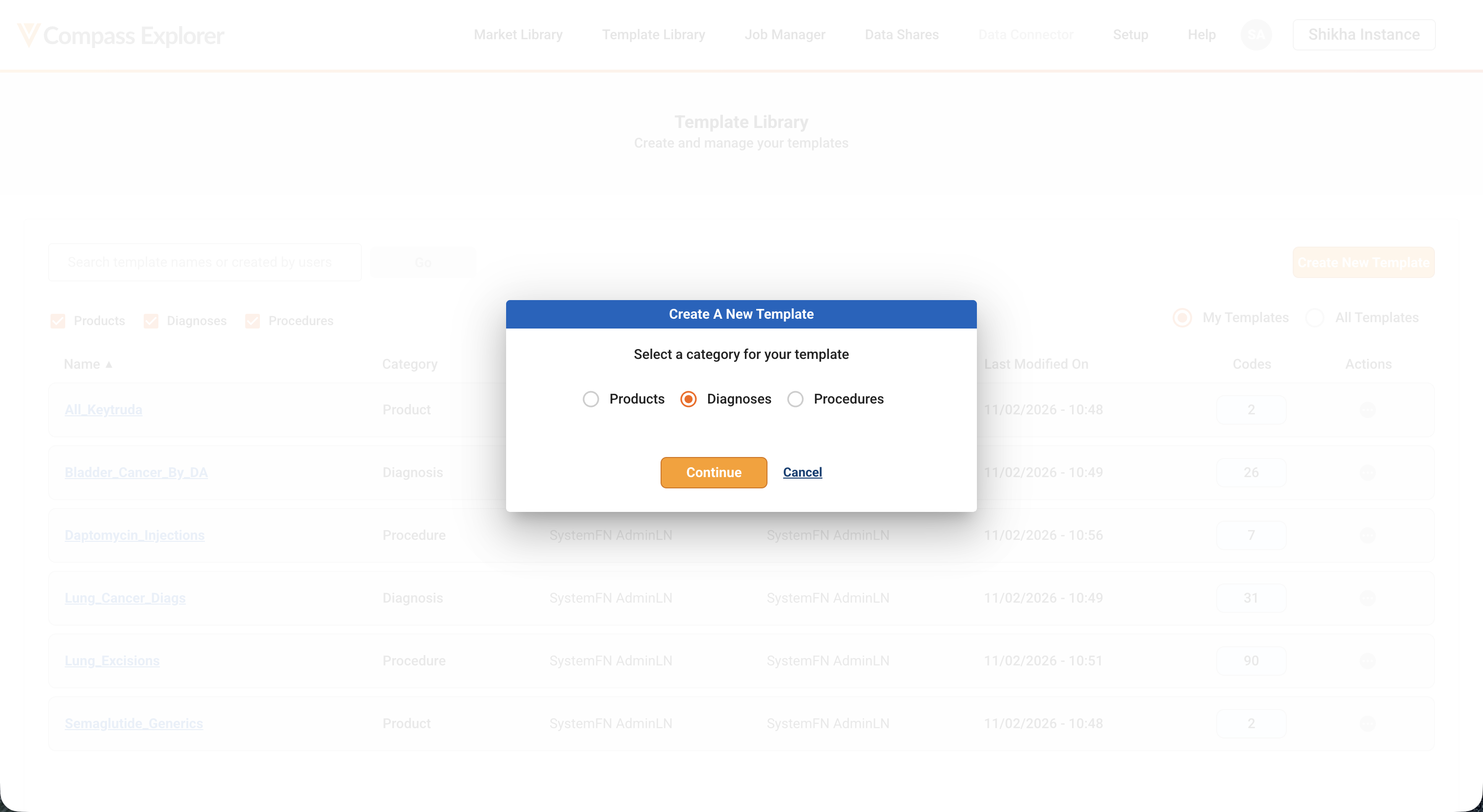
- Build directly from the Template Library by clicking the “Create New Template” button, prompting the selection of a category and redirecting to the respective Code Searcher to add relevant codes.
Image: Template Library category selection when building a new template.
Compass Patient & Compass Pathway
OpenData 2.0 Delivery with Compass Patient & Compass Pathway
The full breadth of OpenData will now be available along with Compass Patient and Compass Pathway data deliveries. This simplifies using Compass and OpenData together, and accelerates understanding market dynamics, targeting and segmentation, and executing on outreach strategies.
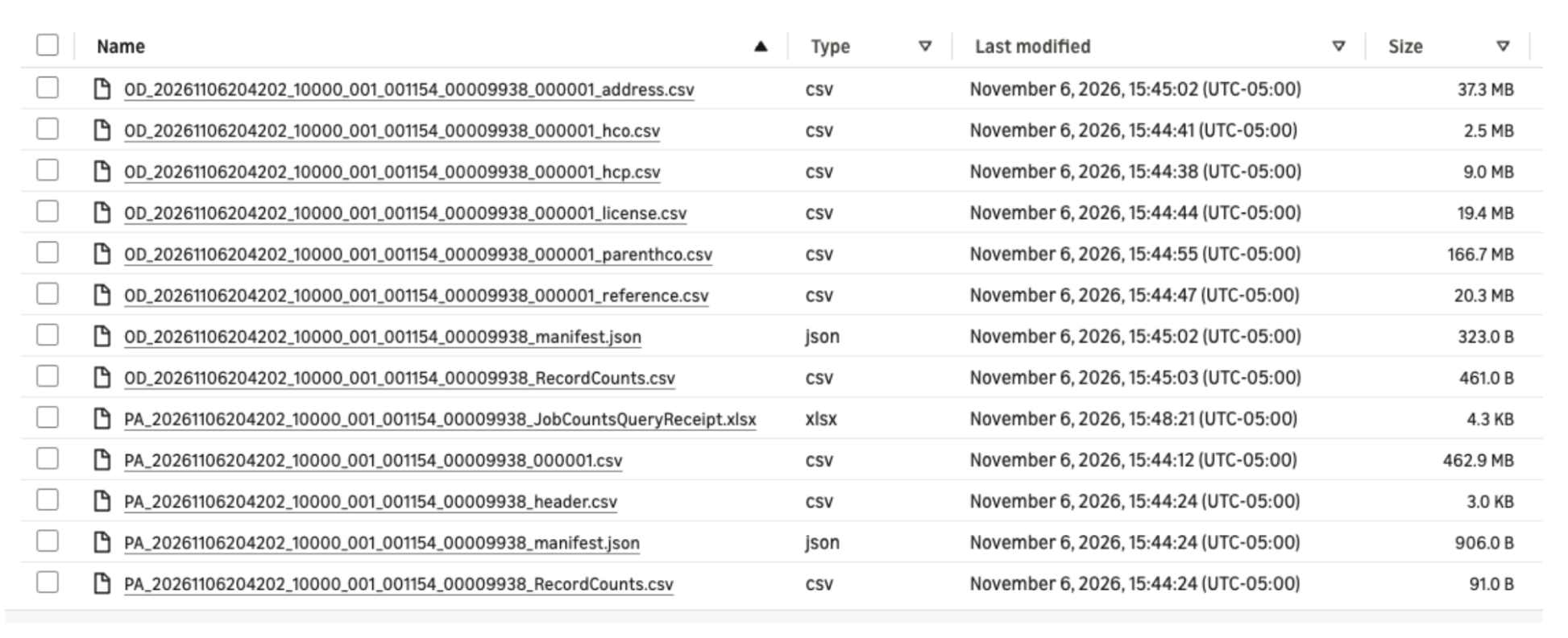
- OpenData will be delivered in the same folder as Compass Patient and Compass Pathway transaction data, with these files starting with an OD prefix to easily distinguish them from other delivery files
- Data is delivered in the same multiple file structure and format as a full OpenData refresh, simplifying data ingestion
- Attributes are specific to OpenData 2.0, and include all five data objects for HCP, HCO, Address, License, and ParentHCO, and the Reference object
- OpenData files are filtered to the list of unique providers present in the Compass provider Veeva ID fields, including HCP, Referring HCP, Billing, and Facility. The Reference object is delivered in full.
- Available to be delivered to SFTP, S3, and Azure destinations
- Available with Compass One-Time jobs and requires an active Veeva OpenData License
For questions or help setting up this feature in your instance, please reach out to your Product Expert.
Image: Users can select to have OpenData delivered with Compass transaction data on qualified jobs.
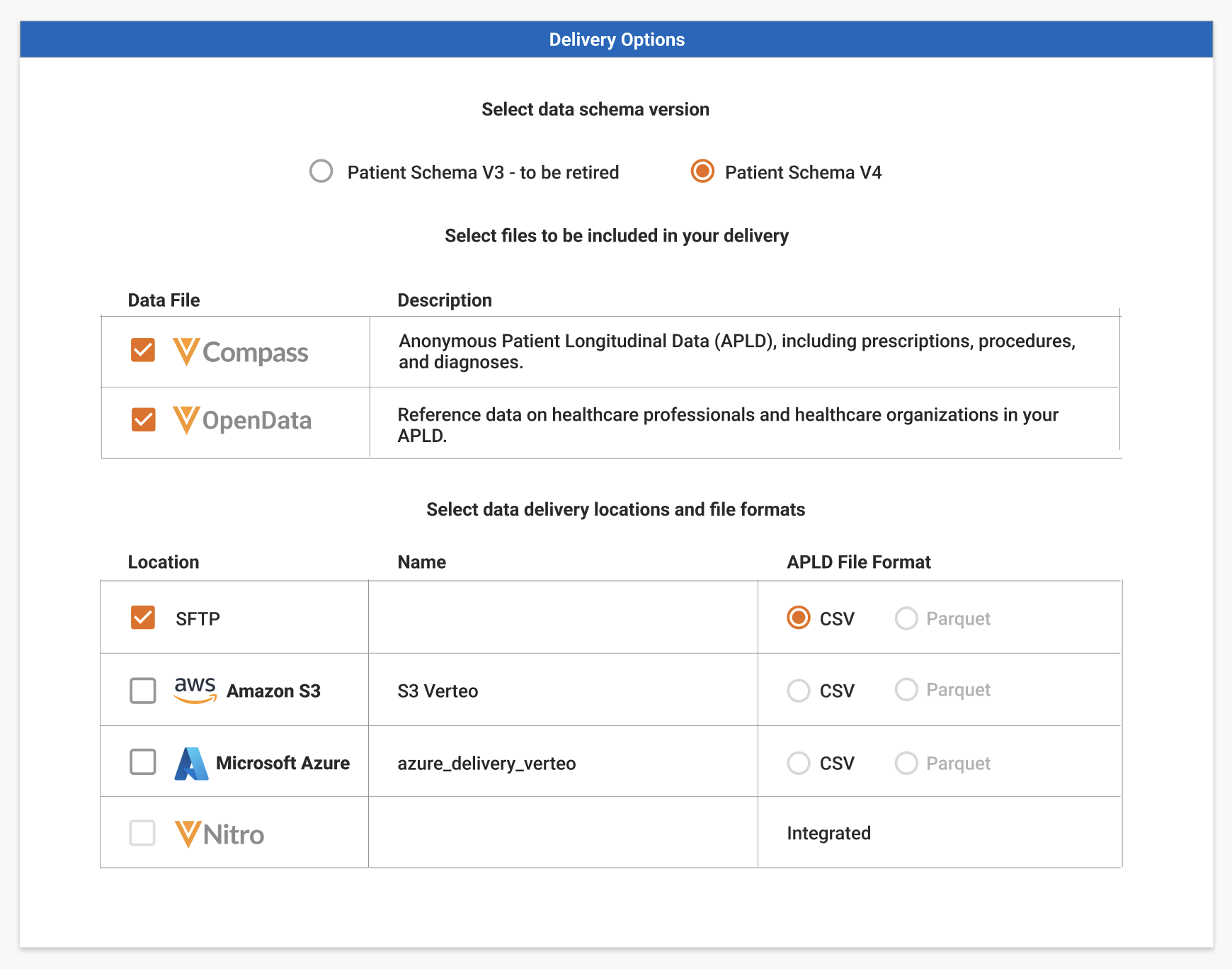
Image: Example of OpenData files with Compass files in a delivery location with Compass data
AI-Supporting Documentation for Compass Patient & Compass Pathway
Compass is excited to announce the creation and delivery of a semantic map, a new Data Cloud standard for supporting AI-readiness. This set of machine-readable files enables automated ingest and validation, and provides context for Veeva field definitions, value sets, and relationships.
The semantic map is a folder including three new artifacts:
- Data Dictionary - Structured metadata in JSON format on all delivery fields, including attributes, field lengths, and example values.
- Reference Values - Structured metadata in JSON format on expected values, value ranges, descriptions, value-to-description lookups, and field relation hierarchies.
- Context - Narrative context in .md format on product descriptions, field relationships, terms & conditions, and other product information.
The Data Cloud standard for supporting AI-readiness means all Data Cloud products will use:
- The same folder name and structure to deliver the data to customers
- The same three files, following the same content and file type structure
This consistency will ensure that AI models and projects using any Data Cloud data have the same high-quality input for definitions, reference sets and context, supporting high-quality output.
For Compass Patient and Compass Pathway customers, the semantic map folder and files will be delivered with the same frequency and parameters as the excel-format Data Dictionary.
Data Quality Updates
As part of the Compass commitment to ongoing quality improvements, a number of attributes are being enhanced for quality and fill rates in both Compass Patient and Compass Pathway.
- Improved Place of Service visibility on high-interest care settings, improving overall fill rate from 94% to 97% with a significant improvement to End-Stage Renal Disease Treatment Facility identification
- Improved fill rate on Claim Type improving the fill rate to 99% by enriching the Claim Type based on fields that are unique to Institutional and Professional claims.
- Improved fill rate on HCP_ID for a small volume of records enriched from license numbers
- The fill rate of Facility Type is improved to 82% on MX records through enriching the Facility ID field with Billing Provider details when the Billing Provider is an appropriate entity type. This update provides better completeness of data for customers looking to create a comprehensive breakdown of facilities associated with medical claims.
Compass Data Connector
Daily Data in Compass Data Connector
Veeva Compass Data Connector - an add-on to Compass Patient - provides HIPAA-compliant data integration for specialty pharmacy, lab results, and genomics data. Veeva ingests and cleans this data, and provides matched patient IDs to the catalog of Compass data network patients, for easy joining in the analytic tools of your choice.
We are excited to announce that with this update Data Connector can now ingest and deliver daily, supporting rapid insights that can support targeting programs, influence patient eligibility definitions, improve time to treatment, enhance targeting and segmentation, and provide visibility into patient outcomes.
Data Connector Specialty Pharmacy Schema Update
The Specialty Pharmacy for Data Connector schema has been expanded to include new attributes and clean up storage of little used values. Highlights of the V4 schema include:
- Expanded HCP data from Veeva OpenData for Rendering HCPs, including
- First Name and Last Name facilitates higher quality matching to reference data.
- HCP Type provides more precise filtering to actionable prescribers, including Physicians (MDs, DOs) and Physicians Assistants and Nurse Practitioners.
- HCP Specialty includes more granular values specific to the US health system to improve target lists and replaces the HCP CDA Specialties.
- Updating fields for consistency with Patient V4 schema, including:
- Expanded payer data from Veeva Compass Payer, including Parent Payer Veeva ID and Name and PBM Veeva ID for the record-level payer.
- Updating field names from VID to Veeva ID in Payer and Plan Names
- Retiring fields including PBM Relationship Type, Pharmacy Type, and Product JCode
- Retiring Pathway fields including Originally Prescribed Product ID and Name, Dispense as Written, and Reject Codes 1 and 2
Compass National & Compass Prescriber
Expanded Disease Area Projections:
We are excited to announce that Disease Area projections will be available for all metrics in Compass Prescriber and Compass National, providing deeper insights into multi-indication products. This update includes:
- Total Prescriptions (TRx)
- Total Procedures (TMx)
- Payer Mix (Commercial Tx, Medicare Tx, Medicaid Tx)
These additional Disease Area metrics will be available in Schema V3 deliverables with month, quarter, and year projections. Starting in December, queries containing Disease Area metrics will update to include TRx, Tx, and Payer Mix.
- New queries will include these metrics starting on December 16th.
- Recurring monthly queries will include these metrics for their next run starting on December 28th.
CSV and Parquet files will have additional rows for each Product-Metric-Disease Area, while Excel files will display all Disease Area metrics on the dedicated “Disease Area” tab.
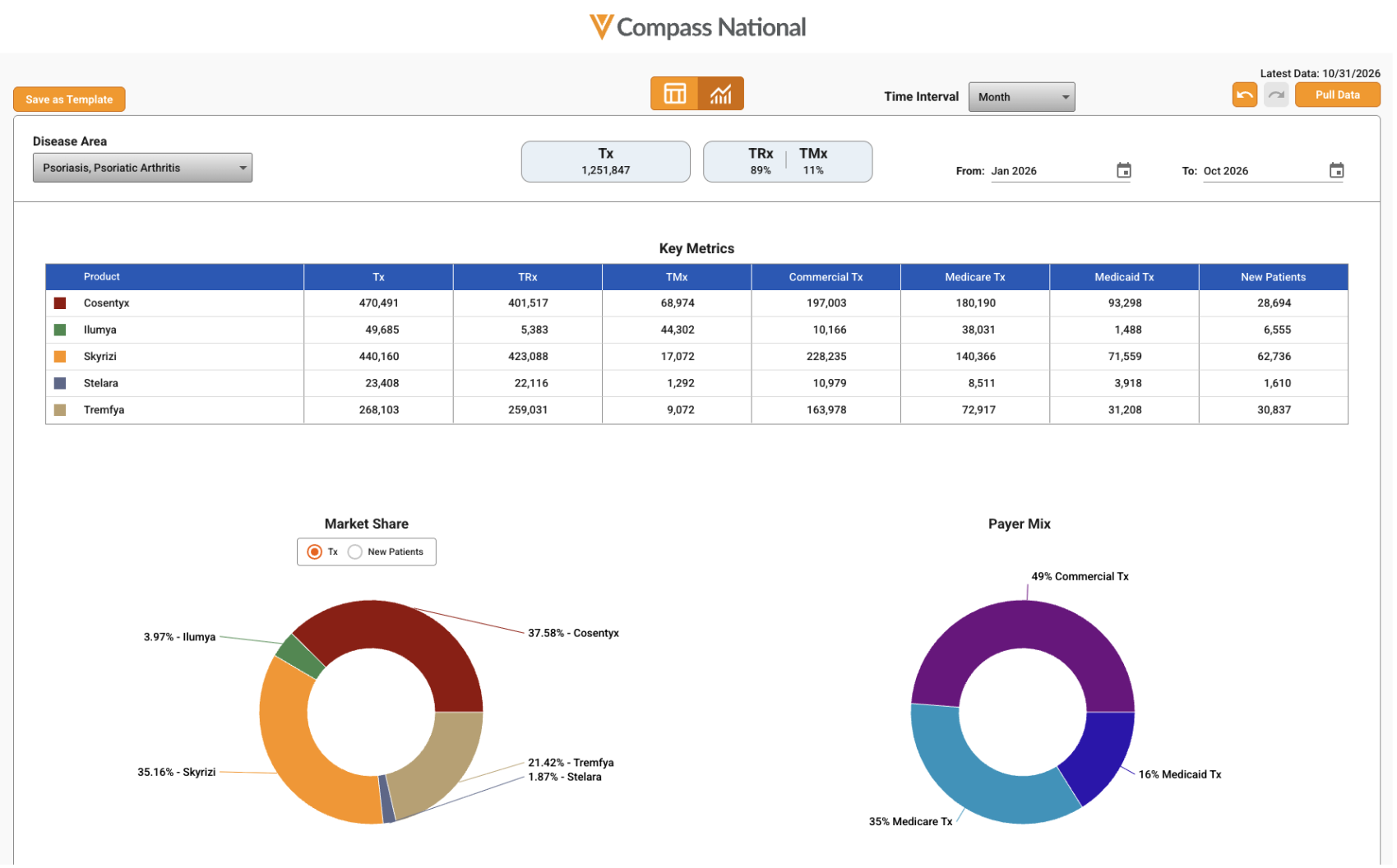
Visualization Enhancements Compass National visualizations will be updated to display Disease Area projections for these metrics. The TRx/TMx summary metrics, Key Metrics table, and Payer Mix chart will all refresh when a Disease Area filter is applied to reflect volume for the chosen subset of Disease Areas.
Image: Compass National allows users to visualize product utilizations and trends by condition
Prescriber Specialties
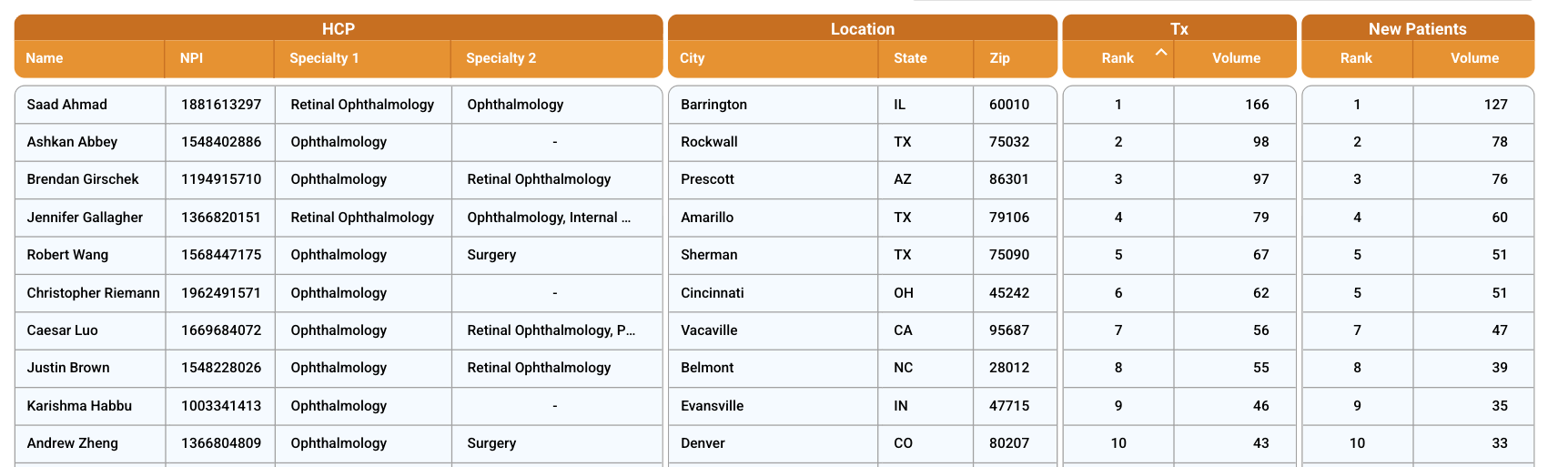
The Top HCPs module in Compass Prescriber will feature updated specialties. The specialty field will display values from the V3 schema, which includes more granular specialties specific to the US health system. For example, the updated specialty differentiates between “Ophthalmology” and “Retinal Ophthalmology”. This increased granularity allows you to more accurately identify top prescribing HCPs in your market and refine your target lists.
Image: Compass Prescriber provides insight into who the Top HCPs are for your market and explores their treatment & patient volume
Streamlining Prescriber & Zip Deliverables
We are updating Compass Prescriber deliverables to streamline files and help you focus on the most relevant data. In Prescriber and Zip Schema V3 files, only records with volume within the queried time frame will be included. Any zip codes or HCPs that have zero volume for a user’s selected criteria will be filtered out.
For National and State V3 files, all records will continue to be delivered since file sizes are more manageable. If a record has volume anywhere within our dataset, it will be included in National and State deliverables.
Projection Quality Enhancements
Accounting for Data Maturity
We are enhancing how we account for reporting delays in medical claims. This update is designed to make recent-period transactions more complete and reduce apparent declines caused by claims processing lags. Impact will vary by product and geography; however, users can expect to see an overall increase in recent-period transaction volume for Tx, TMx, and New Patients.
New Patients
We are updating our New Patient projections to more accurately reflect a product’s lifecycle. This update better captures early product uptake and evolution of new-patient activity after launch. Impacted products will see increases in New Patient projections closer to the launch period.
Disease Area
We are also improving Disease Area projections by updating patient history lookback to prioritize more recent data. This may result in minor shifts to a product’s historical volume. Overall, users will see less than 1% volume shift to the “unassigned” Disease Area in prior years, though the impact will vary by product and geography.
These three projection quality enhancements will be available in Weekly projections starting on December 17; and in Monthly, Quarterly, and Yearly projections starting on December 28th.